
 Doc Summary

This guide explains how you can send a fax directly from your PBX web portal without needing a physical fax machine.
✅ What you need before sending a fax #
Make sure you have:
- Your PBX portal login credentials 🔐
- The document you want to fax (PDF, Word, or image file) 📄
- The recipient’s full fax number, including country code 🌍
🚪 Step 1 — Log in to your Portal #
- Open your PBX web portal in your browser.
- Enter your username and password and sign in.
🧭 Step 2 — Navigate to the Fax Area #
Go to:
Applications ➜ Fax ServerYou will see one or more fax servers listed.
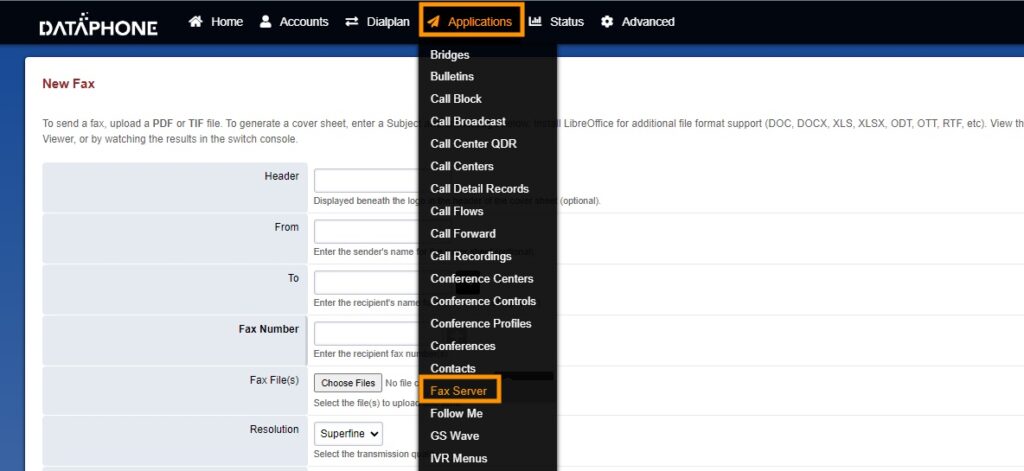
📡 Step 3 — Select a Fax Server #
Click on the Fax Server you normally use for sending faxes.
Then click:
➕ New
This will open the New Fax form.

📝 Step 4 — Fill in the Fax Details #
Complete the fields below in the New Fax section:
| Field | Required? | What it means | Example |
|---|---|---|---|
| Header | Optional | Text that appears on the cover page | “Confidential Fax” |
| From | Optional | Your name or company name | “ABC Medical Center” |
| To | Optional | Name of the recipient | “John Smith” |
| Fax Number | ✅ Required | Recipient’s fax number with country code | 12125557890 |
| Fax File | ✅ Required | Upload your document | PDF, DOCX, or Image |
| Resolution | Optional | Quality of the fax | Standard / High |
| Page Size | Optional | Size of fax pages | A4 / Letter |
| Subject | Optional | Short description of fax | “Medical Records” |
| Message | Optional | Message on cover page | “Please review attached document.” |
| Footer | Optional | Extra note for recipient | “Call if questions.” |
👁️ Step 5 — Preview (Recommended) #
Before sending, you can click:
👁️ Preview
This lets you see exactly how your fax will look to the recipient.
📤 Step 6 — Send the Fax #
When ready:
- Go to the top-right corner
- Click Send
Your fax will now be transmitted through the system.
📬 What happens next? #
After sending:
- The system will attempt to deliver your fax
- You can check the status in the Fax Logs / Sent section

⚠️ Important Tips #
- Always include country code in the fax number
- Make sure your file is clear and readable
- Avoid very large files if possible
- Use PDF format for best results


