
 Doc Summary

Knowing the IP address of your Poly VVX phone is often required for device provisioning, network troubleshooting, or remote access by support teams. This guide walks you through the process step by step for all major Poly VVX models.
🧭 When Would You Need the IP Address? #
- 🔧 Phone provisioning or re‑provisioning
- 🛠️ Troubleshooting call or network issues
- 🌐 Accessing the phone’s Web UI
- 📡 Verifying network connectivity
🪜 Step‑by‑Step Instructions (Menu Method) #
Follow the steps below directly from your Poly VVX phone:
1️⃣ Open the Main Menu #
- Press the 🏠 Home button on the phone keypad.
2️⃣ Go to Settings #
- Select ⚙️ Settings from the menu.
📌 Where to find Settings depends on your model:
| 📱 Poly VVX Model | 📍 Location of Settings |
|---|---|
| VVX 101 / 201 / 301 | Second page of the menu → scroll ▶️ right |
| VVX 400 / 410 | Bottom row of the main menu |
| VVX 500 / 510 | Bottom row of the main menu |
| VVX 600 | Bottom row of the main menu |
| VVX D60 (DECT) | Bottom of the menu |
3️⃣ Navigate to Network Details #
Follow this exact path:
Settings → Status → Network → TCP/IP Parameters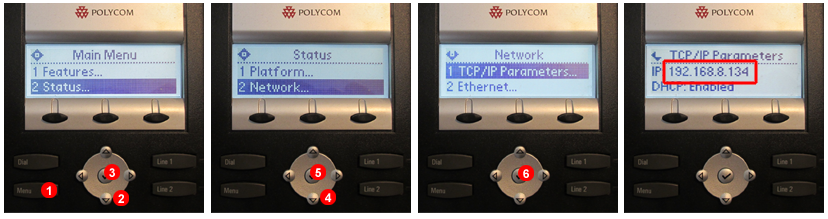
🌐 Viewing the IP Address #
Once inside TCP/IP Parameters, the phone’s IP Address will be displayed.
🔢 What does it look like? #
An IP address consists of four numbers (0–255) separated by periods:
- ✅
192.168.0.25 - ✅
10.1.10.131
⚡ Quick Shortcut (Works on All Poly® VVX Models) #
You can instantly view the IP address without navigating menus:
⌨️ Shortcut Method #
- Press and hold the following keys at the same time:
1 + 4 + 7
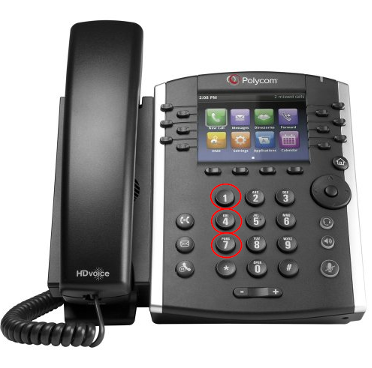
- Keep holding until the screen changes 📺
- The IP Address will be shown directly
✅ This shortcut works on all Poly® VVX models.
📝 Helpful Notes #
- If the phone does not show an IP address, it may not be connected to the network.
- Ensure the Ethernet cable is securely connected and the network is active.
- If the IP starts with
169.254.x.x, the phone is not receiving an address from DHCP.
📩 Need Help? #
If you’re unable to locate the IP address or need assistance accessing the phone’s web interface, please contact our Support Team and share the phone model you’re using.
We’re happy to help! 😊


